

$ npm install -g server-studio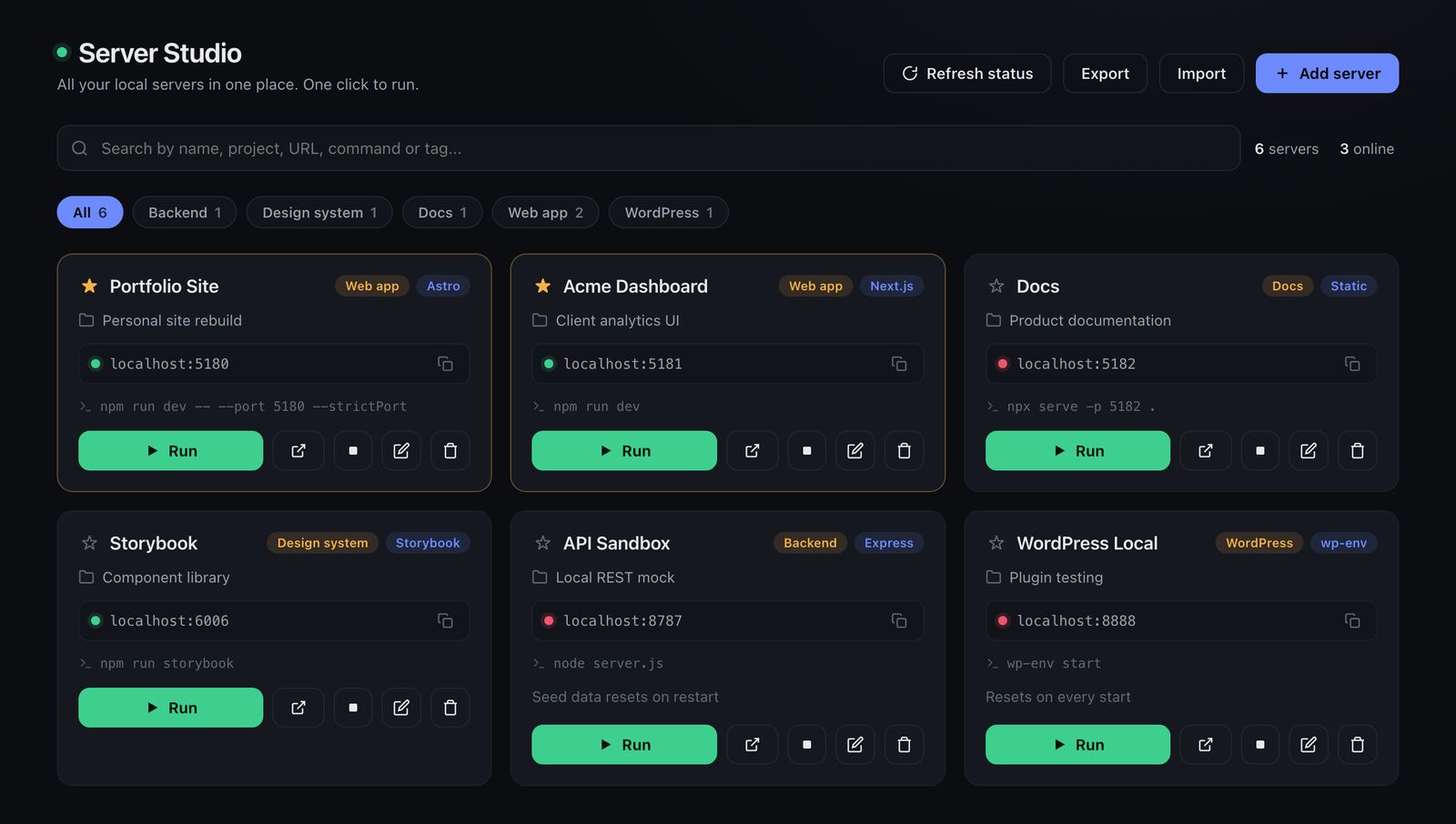
Why it exists
Switching projects always costs the same few minutes.
Which port was this one on. What was the exact command. And what is already sitting on that port from a week ago. Multiply that by every project you have open in a month and it adds up to real time, spent on nothing.
- 01
One card per project
Folder, run command and URL live on the card. Click Run and a real terminal opens in the right directory.
- 02
Live status
A dot next to each URL shows whether that port is answering right now. No more guessing what is already up.
- 03
One permanent port
Every project keeps a port nothing else can take, so a card saved today still works in six months.
Install
Up and running in one command
Node.js 18 or newer is the only requirement. No Electron, no background service, and nothing to install inside the app itself.
- 01
Install it
- 02
Open the app
- 03
Add your first project
How to use it
Add it once, run it forever
- 01
Fill in the card
Only the name is required. Browse picks the folder, and the URL field takes a bare port: typing
5181becomeslocalhost:5181. - 02
Click Run
A real terminal opens in the right folder and runs your command. You see the output and can stop it with Ctrl+C like always.
- 03
Watch the dot
Green means that port is answering, red means nothing is there. It re-checks every 12 seconds. Refresh status forces it immediately.
- 04
Stop something stuck
The stop button kills whatever process is holding that port. It is the fastest way out when a server from yesterday is still sitting on it.
The one rule worth following
Give every project one permanent port
Pick a port nothing else uses, then force the dev server to always use that exact port. Most tools quietly pick a different one when the port is busy. That is exactly how a saved entry goes stale.
| Tool | How to pin the port |
|---|---|
| Vite | server: { port: 5181, strictPort: true } |
| Next.js | next dev -p 5181 |
| Astro | astro dev --port 5181 |
| create-react-app | PORT=5181 react-scripts start |
| Express / Node | process.env.PORT || 5181 |
| PHP | php -S localhost:5181 |
From your editor, or your AI
You never have to fill a card by hand
Server Studio ships a Claude Code skill. Ask Claude to build something with a dev server and it registers the project itself, picks a free port, and writes that port into the config with the strict flag set.
save this server to Server StudioThe skill is only a wrapper. Registering a project is a plain command with no AI involved. Cursor, Copilot, a Makefile, a shell alias, or you can all call the same thing.
$ server-studio add --name "Portfolio Site" --cwd "$PWD" --command "npm run dev" --assign--assign picks a free port and prints PORT <n>. Running it again for the same project updates the other fields but keeps the port locked.
Free and open source
MIT licensed, zero dependencies
No account, no telemetry, and no server anywhere but yours. Built by Md Mahdi Hasan.
